Meta AI Imagine Yourself 2026 | How to Setup Your AI Avatar on WhatsApp Instantly
-
What Is Meta AI Imagine Yourself
- WhatsApp Meta AI Imagine Yourself System Specifications
- Viral Prompt Combinations to Try Instantly
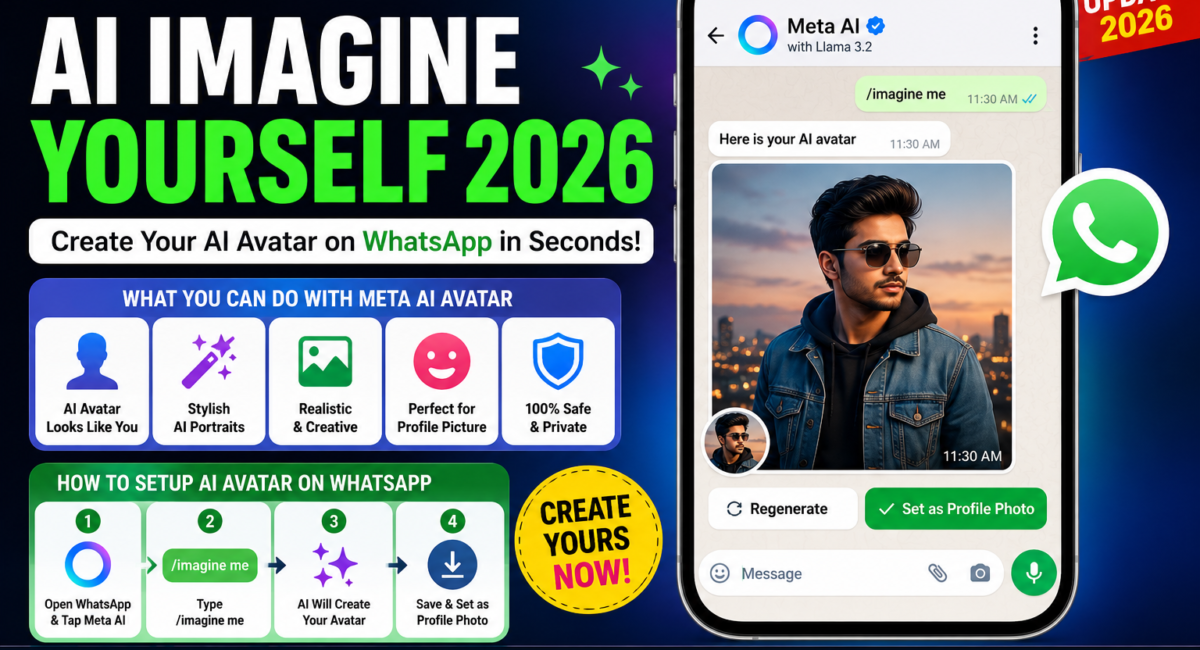
- How to Setup Your AI Avatar on WhatsApp Meta AI Imagine Yourself
- Step 1: Update WhatsApp
- Step 2: Open Meta AI Chat
- Step 3: Type Imagine Me
- Step 4: Follow On Screen Instructions
- Step 5: Generate and a Save Your Avatar
- Meta AI Imagine Yourself Free
- Best Prompt Ideas for AI Avatars
Meta AI Imagine Yourself 2026 | How to Setup Your AI Avatar on WhatsApp Instantly
WhatsApp Users are constantly discovering a new AI powered features, and one of the a most interesting additions is Meta AI Imagine Yourself feature, Instead of using traditional profile pictures and manually editing images, users can now generate AI versions of themselves directly the through Meta AI
Over the a last few weeks, many WhatsApp users is have noticed conversations online about AI generated avatars and personalized image, If you has been wondering how people are a creating these unique AI portraits, the answer is often Meta AI Imagine Yourself features today
explain what the a feature does, how to activate it is, and how you can create your own AI avatar in just a few minutes
What Is Meta AI Imagine Yourself
Imagine Your self is an Ai powered feature a developed by Meta that allows a users to create personalized AI generated images based on their appearance Or text prompts.
Instead a uploading heavily edited photos, users can ask Meta AI to a generate different versions of themselves in various styles, outfits, professions, locations, and creative scenarios
For the example, users can create a images of themselves as:
- A business professional
- A traveler exploring new destinations
- A futuristic character
- A fitness enthusiast
- A digital creator
- A super hero inspired avatar
The feature is a designed to make AI image generation more personal and accessible
How to Setup Your AI Avatar on WhatsApp Meta AI Imagine Yourself
Step 1: Update WhatsApp
Make sure your using is a latest version of WhatsApp available for your device play store
Step 2: Open Meta AI Chat
Inside WhatsApp, locate the Meta AI option and start a conversation
Step 3: Type Imagine Me
In supported regions, users can use prompts such as:
Imagine me as a business professional
Imagine me as a traveler
Imagine me in a futuristic city
Meta AI will use the information available to generate personalized images.
Step 4: Follow On Screen Instructions
Some users may be asked to provide reference photos or complete additional setup steps depending on feature availability.
Step 5: Generate and a Save Your Avatar
Once the image is generated the you can save it and use it as a your profile picture, social media image and personal avatar
Meta AI Imagine Yourself Free
Eligible users, the feature is a generally available within supported a Meta AI experiences without requiring a separate subscription plans
However, availability may vary depending on the your region, device, WhatsApp version, and a Meta rollout schedule
Best Prompt Ideas for AI Avatars
If you’re unsure what to create, here are some popular prompts:
- Imagine me as a successful entrepreneur
- Imagine me working at a modern tech company
- Imagine me in a luxury travel destination
- Imagine me as a professional photographer
- Imagine me as a futuristic AI engineer
- Imagine me in a cinematic movie poster style
- Imagine me as a fitness coach
Frequently Asked Questions (FAQs)
Q1: Does Meta store and sell my raw personal selfie uploads after creating the AI avatar profile
Answer: According to the structural corporate data protection and a metadata privacy frameworks by Meta policy, all source calibration photo graphs are fully encrypted and can be manually be cleared by the profile administrator at any calendar time is a frame through the core account settings interface block
Q2: Why is a the automated Imagine Me avatar setup option missing inside my active chat bar menu
Answer: Meta rolls out advanced infrastructure modules using staggered regional batch the tracks, If the soundwave or ring engine fails to display the trigger fields, navigate to your device storage parameters, clear the WhatsApp system cache data structures, and restart your mobile connection